AI Providers
AI Chat Mode can talk to more than one AI service. Pick the one
that matches your licensing, your data-residency rules, or your hardware —
GitHub Copilot, Claude, OpenAI, Google AI, Ollama running on your own machine,
or any endpoint that serves the OpenAI /chat/completions API.
Everything else about the panel is identical whichever you choose: the same tools, the same per-call approval, the same chaos and business-understanding workflows.
Choose a provider
- Open the AI chat panel and click Provider in its header — or press Ctrl+K and run AI provider settings.
- Choose a provider from the dropdown. The dialog reshapes itself to ask for what that provider needs.
- Click Save.
The panel's header shows which provider you are connected to, and each reply is labelled with it, so a conversation is never ambiguous about who answered.
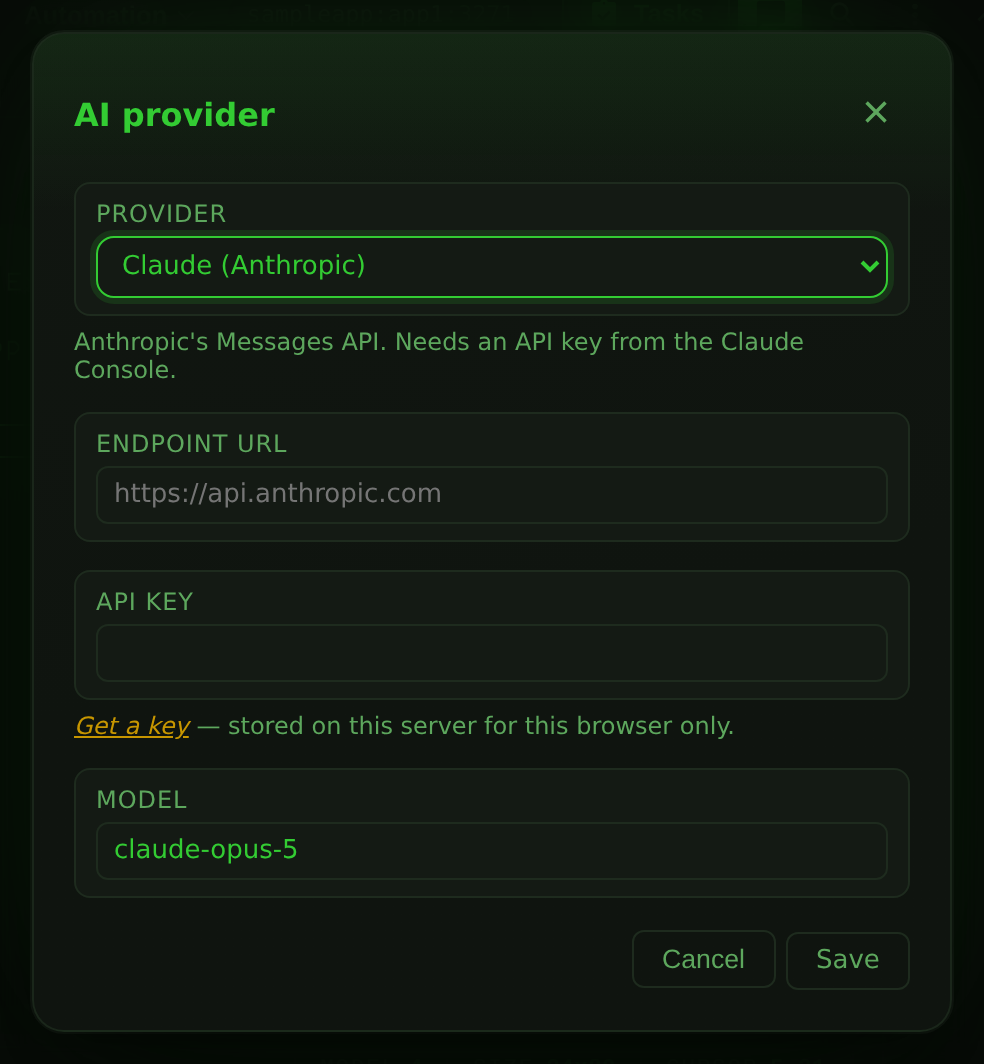
Supported providers
| Provider | Authentication | Endpoint | Notes |
|---|---|---|---|
| GitHub Copilot | GitHub sign-in | fixed | The default. No API key to manage. |
| Claude (Anthropic) | API key | https://api.anthropic.com |
Uses the Messages API. |
| OpenAI | API key | https://api.openai.com/v1 |
|
| Google AI (Gemini) | API key | https://generativelanguage.googleapis.com/v1beta/openai |
Gemini's OpenAI-compatible endpoint. |
| Ollama (local) | usually none | http://localhost:11434/v1 |
A model on your machine or LAN. |
| Ollama Cloud | API key | https://ollama.com/v1 |
Ollama's hosted models. |
| OpenAI-compatible endpoint | optional key | you supply it | vLLM, LM Studio, OpenRouter, Groq, a corporate gateway. |
GitHub Copilot
Select GitHub Copilot and click Sign in with GitHub. A dialog opens with a verification link and a one-time code:
- Use Copy to grab the code.
- Open the link, enter the code, and approve the access request.
- Leave the dialog open and return to 3270Web — it polls automatically and signs you in once you approve.
Models come from your Copilot plan, so what appears in the dropdown depends on your GitHub account.
GitHub Enterprise
GitHub Enterprise is supported, but there is no button for it in the UI. Point 3270Web at your instance by calling the REST endpoint before signing in:
curl -X POST http://localhost:3270/api/copilot/enterprise \
  -H 'Content-Type: application/json' \
  -d '{"url":"ghe.example.com"}'
The value must be a bare hostname (optionally with a port) — for example
ghe.example.com, not https://ghe.example.com/. Pass an empty string to
clear it and go back to github.com.
Claude, OpenAI, Google AI and Ollama Cloud
These four need an API key and nothing else. Select the provider, paste the key into API key, and save. The dialog links to the page where each vendor issues keys.
Leave Endpoint URL alone unless you are routing through a proxy or a regional endpoint.
Ollama (local)
Ollama needs no key. Install it, pull a model that supports tool calling, and make sure it is serving:
ollama pull qwen3
ollama serve
Then select Ollama (local) and save. The default endpoint is
http://localhost:11434/v1.
Where 'localhost' points
The endpoint is called by the 3270Web server, not by your browser. If
you run 3270Web in Docker and Ollama on the host, localhost inside the
container is the container itself — use http://host.docker.internal:11434/v1
(or the host's LAN address) instead.
Ollama on another machine works the same way: give it that machine's address,
and start Ollama with OLLAMA_HOST=0.0.0.0 so it accepts remote connections.
OpenAI-compatible endpoint
Use this for anything that serves /chat/completions in the OpenAI shape.
Fill in Endpoint URL with the directory containing chat/completions —
for most servers that means including the /v1 suffix:
| Service | Endpoint URL |
|---|---|
| vLLM | http://your-host:8000/v1 |
| LM Studio | http://localhost:1234/v1 |
| OpenRouter | https://openrouter.ai/api/v1 |
| Groq | https://api.groq.com/openai/v1 |
Add an API key if the endpoint requires one, and type the model name into
Model — 3270Web asks the endpoint for its model list, but a server that
does not implement /models needs the name entering by hand.
Models
The model dropdown sits above the input box. 3270Web asks the selected provider
for its live catalogue each time you open the panel; when that call cannot be
made — no key entered yet, or an endpoint with no /models route — it falls
back to a short built-in list so the dropdown is never empty.
Each provider keeps its own model, so switching provider and back does not reset your choice.
Tool calling is required
The assistant works by calling tools (get_screen, send_key,
write_field, the chaos and business tools). Every hosted model listed
above supports that. Small local models often do not, or do it unreliably
— if the assistant describes what it would do instead of reading the
screen, pick a model advertised as supporting tools.
Where credentials are stored
API keys and the Copilot OAuth token are stored on the 3270Web server, in
the per-user configuration directory ($XDG_CONFIG_HOME/3270Web on Linux, the
OS user-config directory elsewhere), in files readable only by the account
running 3270Web.
They are scoped to one browser and, where the instance has accounts, to the
account signed in to it. A long-lived cookie identifies the browser; with
AUTH_MODE set, the signed-in account is mixed in, so each
combination gets its own settings file. Keys are never sent back to the
browser; the settings dialog can only tell you that a key is saved, not what
it is.
The account half matters most on a device more than one person uses. The browser cookie lasts a year and signing out of 3270Web does not touch it, so without this the next person to sign in on a shared phone, tablet or kiosk inherited whatever the previous one left behind — a Copilot login, an API key, and the chat transcript filed against it. Now the stored settings change with the account, so there is nothing to inherit. The AI chat transcript in the browser is filed by account for the same reason.
On an instance with a single operator (AUTH_MODE unset) nothing changes:
there is nobody to be kept apart from, and existing sign-ins carry over.
To remove a stored credential, click Sign out in the panel header, or reopen the provider dialog and save an empty key.
Anyone with your browser session can spend your key
Chat requests are proxied by the server using the stored key, so anyone who can reach 3270Web as you can send requests that bill to your account. Treat a 3270Web instance the way you would treat any tool you have signed into.
Endpoint restrictions
Custom endpoint URLs must be plain http:// or https:// origins. 3270Web
rejects URLs carrying credentials, a query string or a fragment.
Where the URL points is checked as well, and at the moment the connection is
made rather than when the URL was saved — a hostname is not an address, and a
name can resolve wherever its owner likes. Link-local addresses
(169.254.0.0/16, fe80::/10) are refused, which is where cloud
instance-metadata services live, and so is a redirect that leads to one. A
hostname resolving to one of those is refused just as a literal is. Private and
loopback addresses are allowed — those are the whole point of the local-Ollama
and corporate-gateway cases.
Changing the endpoint asks for the key again
A key is issued for the endpoint it was entered against. Saving a base URL on a different host clears the stored key rather than forwarding it to the new origin — send a key in the same save if it belongs there. Changing the path on the same host, or the model, leaves the key alone.
REST API
The provider layer is scriptable; see REST API for the full endpoint reference. In brief:
# What can I choose, and what is chosen now?
curl http://localhost:3270/api/ai/providers

# Select Claude and store a key
curl -X POST http://localhost:3270/api/ai/config \
  -H 'Content-Type: application/json' \
  -d '{"provider":"anthropic","apiKey":"sk-ant-...","model":"claude-opus-5"}'

# Is it ready to answer?
curl http://localhost:3270/api/ai/status
Troubleshooting
| Symptom | Cause and fix |
|---|---|
| "… needs an API key" | No key saved for the selected provider. Open Provider and add one. |
| "… rejected the credentials" | The key is wrong, expired, or belongs to a different org. Re-paste it. |
| "Could not reach … at its configured endpoint" | The endpoint URL is wrong or the server is not running. For Docker, see the localhost note above. |
| "The selected model … is not available" | Your account or endpoint does not serve that model. Pick another from the dropdown. |
| Model dropdown shows only a few generic names | The live /models call failed, so the built-in fallback list is showing. Check the key and endpoint; you can still type an exact model name into the provider dialog. |
| Assistant replies in prose and never reads the screen | The model is not calling tools. Switch to a model that supports tool calling. |